


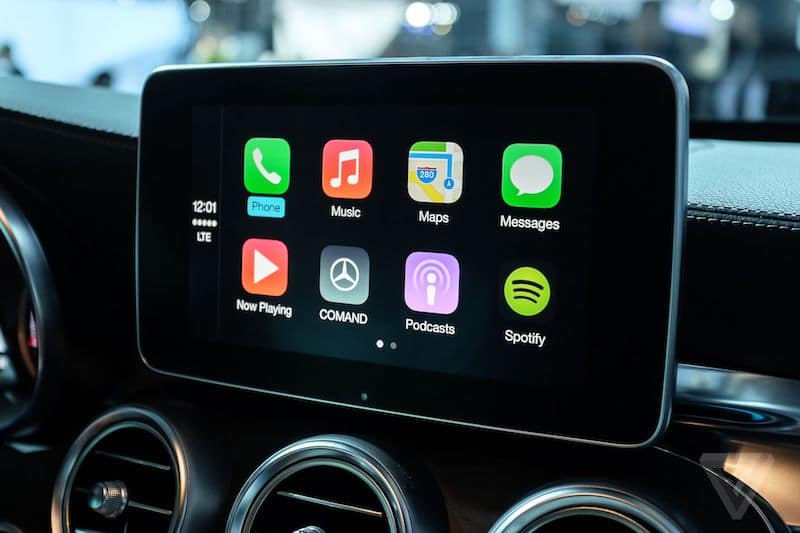

Driving a Mercedes should feel straightforward, but an older infotainment system can make the technology inside the car feel dated. Plenty of Mercedes models left the factory without Apple CarPlay or Android Auto, which means owners can miss out on the smartphone features now commonly used for navigation, music and communication.
Depending on the model, year and infotainment system fitted, it may be possible to add Apple CarPlay or Android Auto while retaining your existing Mercedes display and controls.
If you’ve already decided you’d like to add smartphone connectivity to your car, you can view our Mercedes Apple CarPlay and Android Auto retrofit service to see the available options. If you’re still checking compatibility or want to understand how the different systems work, this guide covers the main points.
What Do Apple CarPlay and Android Auto Add to a Mercedes?
Apple CarPlay and Android Auto bring many of your phone’s most useful features onto your car’s infotainment screen. Rather than relying solely on an older built-in navigation or media system, you can access compatible apps through a familiar interface.
This can give you access to:
- Live navigation and traffic information through apps such as Apple Maps, Google Maps and Waze
- Music, podcasts and audiobooks through compatible apps including Spotify, Apple Music and Audible
- Hands-free calls and messaging using Siri or Google Assistant
- A familiar interface that makes accessing everyday smartphone features easier while driving
Depending on the retrofit and the Mercedes system fitted, these functions can work through the car’s existing screen and controls.
Can Your Mercedes Be Retrofitted?
Many Mercedes models that weren’t originally supplied with Apple CarPlay or Android Auto can be upgraded. Compatibility isn’t based on the model alone, however. The age of the vehicle and, importantly, the infotainment system fitted will determine which option is suitable.
Braybrooks offers Apple CarPlay and Android Auto solutions for a wide range of Mercedes models, including:
- C-Class (W205)
- E-Class (W212)
- GLC (X253)
- A-Class (W176)
- B-Class (W246)
- S-Class (W222)
- GLE & GLS (W166, X166)
These are only some of the compatible models, and different generations can require different solutions.
If you’re unsure which system is suitable for your Mercedes, get in touch and we’ll check compatibility for you.
How Can Apple CarPlay and Android Auto Be Added to a Mercedes?
There isn’t one retrofit method that applies to every Mercedes. The correct approach depends on the vehicle and infotainment system already fitted.
For some compatible cars, the necessary functionality is already present and can be activated through programming or an OBD activation product. Other vehicles require additional hardware to add Apple CarPlay and Android Auto to the existing infotainment system.
Braybrooks currently offers three main approaches:
OBD activation: On compatible vehicles, an OBD activation product can update the relevant vehicle settings to enable Apple CarPlay and Android Auto.
Professional programming: Some systems can be activated by updating the vehicle settings using Mercedes diagnostic equipment.
Hardware installation: Where activation isn’t possible, additional hardware can be installed to add Apple CarPlay and Android Auto while making use of the existing Mercedes screen and controls.
This is why checking compatibility before choosing a product is important. Two Mercedes models from similar years may use different infotainment systems and therefore require different solutions.
Do You Need to Replace the Mercedes Head Unit?
Not necessarily. Many of the available options are designed to work with the Mercedes infotainment equipment already in the car rather than replacing the complete head unit, display and controls.
Depending on the system, Apple CarPlay and Android Auto can be added to the existing screen, with compatible functions operated through the car’s original controls.
This allows you to gain access to modern smartphone features without unnecessarily changing the appearance of the dashboard or removing useful existing functions.
How Do I Know Which System My Mercedes Needs?
The model and year are a useful starting point, but they don’t always tell the full story. Mercedes used several generations of infotainment equipment across its model range, and there can be differences between cars that appear very similar.
Before choosing an Apple CarPlay or Android Auto solution, it’s therefore important to identify the infotainment system fitted to your particular vehicle.
If you’re unsure, Braybrooks can help confirm compatibility and advise which of the available options is appropriate for your Mercedes.
Find the Right Apple CarPlay or Android Auto Option for Your Mercedes
Adding Apple CarPlay or Android Auto can be a useful way to bring more up-to-date navigation, entertainment and communication features to a Mercedes that wasn’t originally supplied with them.
The important part is choosing a solution that matches the model, year and infotainment system already fitted.
If you’re unsure which option is right for your vehicle, contact Braybrooks and we can check compatibility and advise you on the options available. You can also call us on 0800 052 0292 to discuss your Mercedes.